Resource Analysis
Resource Analyzer helps you understand how your quantum algorithm uses resources through detailed metric analysis and visualization.
Available Metrics
Resource Analyzer can display various resource metrics depending on what was measured in your quantum resource estimate:
- Toffoli Gates (TOFs) - Number of Toffoli operations
- T-Gates - Count of T-gate operations
- Left/Right Elbows - Specific operation counts
- Local Ancillae - Ancilla qubit usage
- Rotations - Quantum rotation operations

Multi-Metric Analysis
Viewing Multiple Metrics
- Select "All Resource Counts" in the metric selector
- Compare different resource types side by side
- Look for correlations between different metrics
- Identify trade-offs between resource types
Metric Comparison
While you can view multiple metrics simultaneously, remember that different resource types often use different scales and cannot be directly compared.
Setting Cost Property
Change which metric determines node coloring:
- Open Graph Setup (gear icon)
- Select desired metric in "Cost property"
- Choose appropriate scale (Log10 recommended for quantum resources)
- Set Scale max to the cut-off above which everything should be full red, or leave at Max root cost for automatic gradients
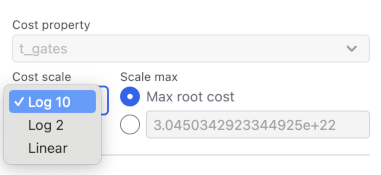
Choosing Cost property
Choosing which Cost Property should be used for costing is only availble when "All Resource Counts" is selected.
Analyzing Resource Distribution
Understanding Node Colors
- Dark Red: Highest resource usage
- Light Red: Moderate resource usage
- White: Minimal or zero resource usage
Interpreting Metrics
Each node shows four key values:
- Calls Frequency: Times this node is run per parent node run
- Resources Per Call: Resources used in a single function call
- Resources Total: Cumulative resources across all calls
- Percentage: Portion of total program resources
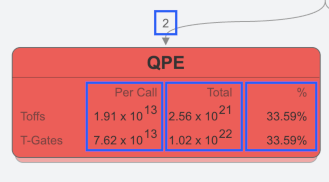
Finding Hotspots
- Look for darkest colored nodes
- Check both per-call and total resource usage
- Consider call frequency when evaluating impact
- Follow dark paths to identify expensive call chains
Resource Optimization
Identifying Optimization Targets
- Focus on nodes with highest total resource usage
- Consider frequency of calls multiplied by per-call cost
- Look for repeated patterns that could be optimized
- Examine parent-child relationships for restructuring opportunities
Optimization Strategy
- Start with darkest nodes (highest resource usage)
- Evaluate per-call vs total usage patterns
- Consider call frequency in optimization decisions
- Document baseline measurements before optimization
Optimization Priority
Even small per-call improvements in frequently called functions can lead to significant total resource reductions.