Resource Analyzer Viewer
The Resource Analyzer Viewer extension enables you to visualize Quantum Resource Estimates (QREs) directly within the QDE. This integrated viewer transforms complex resource estimation data into interactive visual hierarchies, helping you understand and optimize quantum algorithm resource requirements.
Using Resource Analyzer Viewer
The Resource Analyzer Viewer automatically activates when you open files with .qre-analysis or .qre-analysis.json extensions in VS Code Web
Key Features
- Interactive Hierarchical View: Navigate resource estimates through expandable tree structures
- Multiple Resource Metrics: View mulitples resource types like Active Volume and Toffs simultaneously or individually
- Percentage Analysis: Understand resource distribution across algorithm components
Generate a .qre-analysis file
You can use Workbench to generate a .qre-analysis file. Simply serialize the QPU to a .qre-analysis file then use Construct Tools to view it.
from psiqworkbench import QPU
from construct_tools import CallGraph, FlameGraph

qpu = QPU(num_qubits = 10)

# Your code goes here
...

qc.serialize("../path/to/file.qre-analysis", dialect="qre-analysis")

CallGraph(src="../path/to/file.qre-analysis")
Viewing Resource Estimates
When you open a Resource Analyzer file in the QDE, the extension renders an interactive visualization showing resource requirements at multiple levels of detail. The viewer presents quantum resource estimates in a hierarchical format, allowing you to drill down from high-level algorithm costs to individual component contributions.
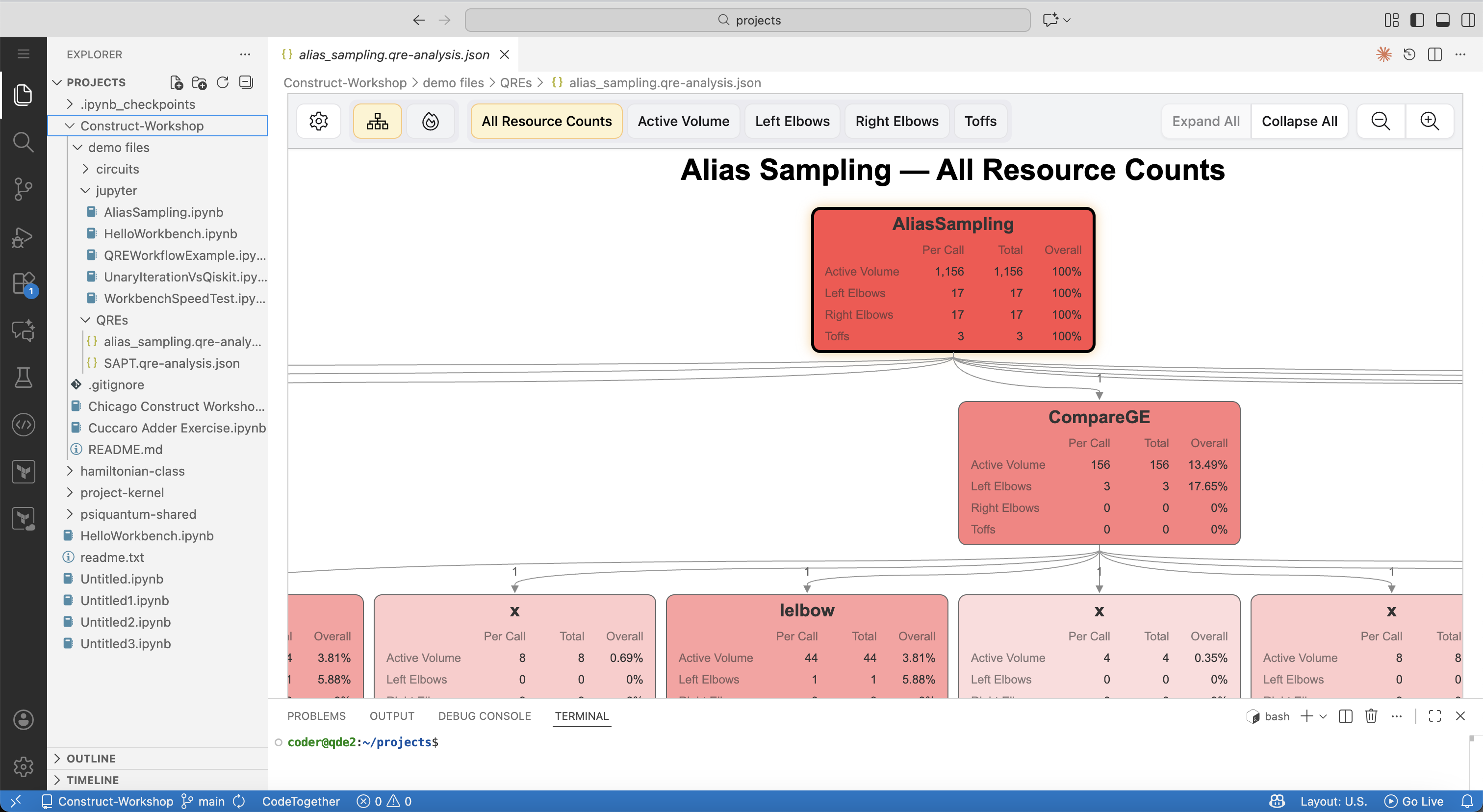 Resource Analyzer Viewer displaying resource estimates for an Alias Sampling quantum algorithm with detailed breakdowns
Integration with Construct
The Resource Analyzer Viewer seamlessly integrates with resource estimates generated by Resource Analyzer. Save your analyses in a Construct project, then open them in QDE to explore resource requirements alongside your quantum algorithm implementation.
For complete resource estimation capabilities and documentation, visit the Resource Analyzer.