How to Draw a Circuit
This how-to guide walks you through drawing a circuit generated by a simple Workbench program. We will cover two ways of drawing a circuit:
- Using the built-in
draw()method. - Using the interactive Circuit Designer widget.
Step 1. (common to both methods) Write the program
Write the Workbench code following the steps outlined in How to Write a Simple Program. Your code will start with creating a QPU object.
qpu = QPU(num_qubits=4)
If you are specifying the list of filters in the constructor of the QPU, make sure to include the '>>buffer>>' filter in the list.
qpu = QPU(num_qubits=4, filters=['>>buffer>>', '>>bit-sim>>'])
Step 2a. Draw the circuit using the qpu.draw() method
Call the draw() method of the QPU object to draw the circuit.
qpu.draw()
If your code uses subroutines - either built-in Workbench subroutines or Qubricks you implemented yourself - call the draw() method with show_qubricks=True argument.
qpu.draw(show_qubricks=True)
Step 2b. Draw the circuit using interactive Circuit Designer widget
Import the circuit_designer module from psiqworkbench.integrations subpackage and call the draw function, passing it the QPU instance. Please note that for this to work, Workbench has to be installed with circuit-designer extra.
from psiqworkbench.integrations import circuit_designer
circuit_designer.draw(qpu)
You can click on registers and Qubricks in the diagram to collapse and expand them. You can also pass the expanded=True, expanded="qubricks" or expanded="registers" to control what gets expanded by default.
Example
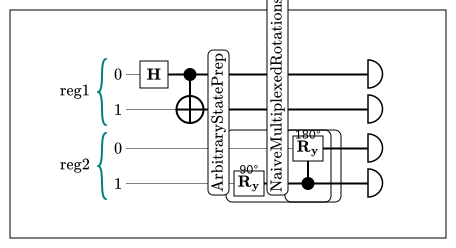
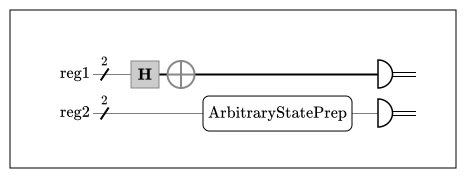
The following example shows how to draw a circuit generated by the Workbench program from How to Write a Simple Program that prepares two Bell states in two different ways (using the primitive gates and using state preparation library) and then measures them.
from psiqworkbench import QPU, Qubits
from workbench_algorithms import ArbitraryStatePrep
# Initialize a QPU
qpu = QPU(num_qubits=4)
# Allocate qubits
reg1 = Qubits(2, "reg1", qpu=qpu)
reg2 = Qubits(2, "reg2", qpu=qpu)
# Perform the computation using primitive gates
reg1[0].had()
reg1[1].x(cond=reg1[0])
# Perform the computation using library routines
state_prep = ArbitraryStatePrep([1, 0, 0, 1])
state_prep.compute(reg2)
# Get the results
res1 = reg1.read()
res2 = reg2.read()
# Draw the circuit
qpu.draw()
# Draw the circuit with Qubricks
qpu.draw(show_qubricks=True)


from psiqworkbench.integrations import circuit_designer
# Create Circuit Designer diagram with default setting
circuit_designer.draw(qpu)
# Create Circuit Designer diagram with both Qubricks and registers expanded
circuit_designer.draw(qpu, expanded=True)